


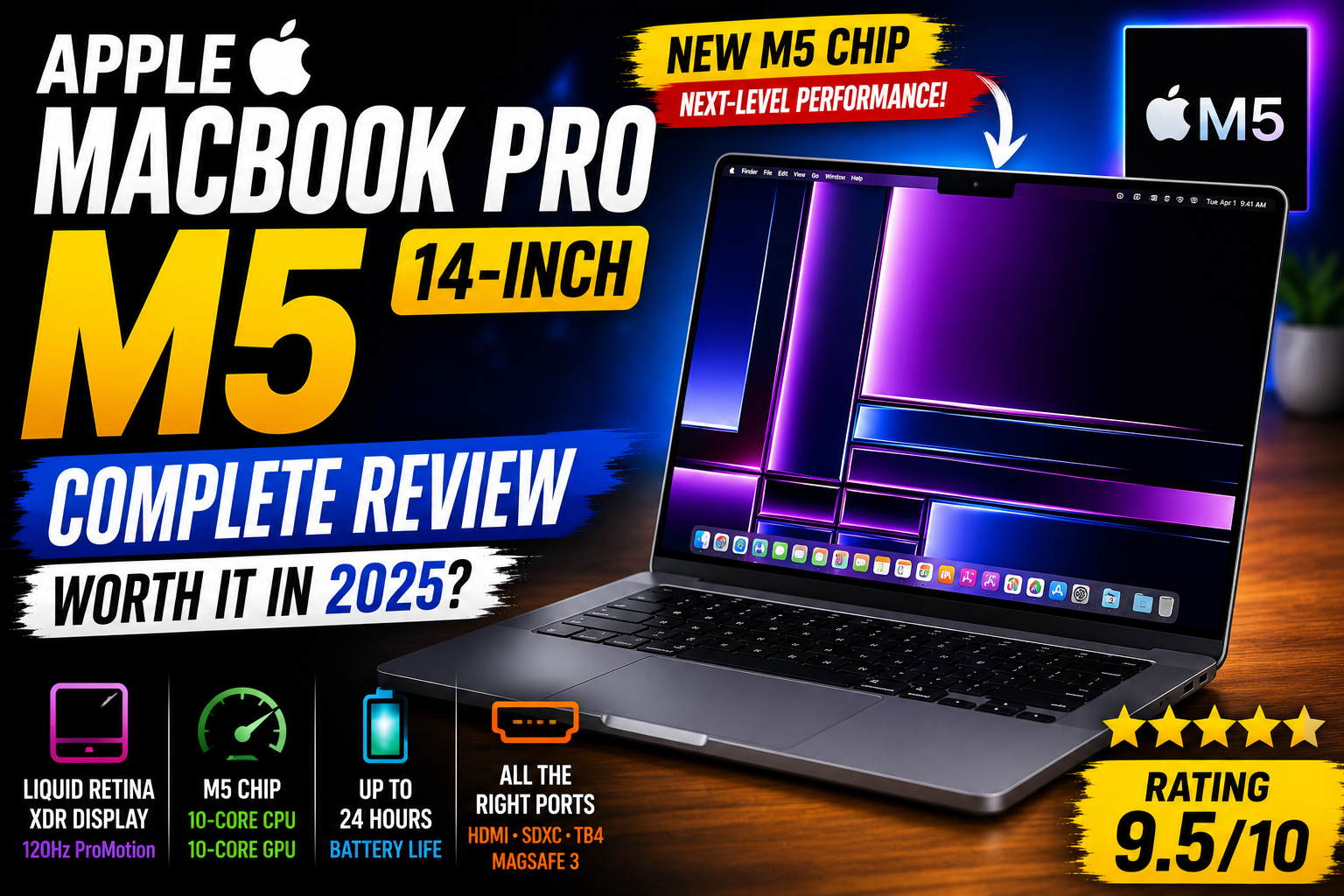
The Apple MacBook Pro 14-inch with M5 is Apple’s latest compact professional laptop, combining the new M5 chip with a stunning Liquid Retina XDR display, excellent battery life, fast storage and a powerful collection of connectivity options.
Apple has positioned the M5 MacBook Pro as a machine for professionals, developers, creators, students and power users who want serious performance in a relatively compact laptop.
But is the MacBook Pro 14-inch M5 actually worth buying?
After looking at its performance, display, battery life, design, connectivity and overall value, here’s our detailed review.
MacBook Pro 14-inch M5 – Quick Verdict
Our Rating: 9.5/10
The M5-powered MacBook Pro 14-inch is an outstanding premium laptop for professionals, developers, creators and demanding everyday users.
Apple MacBook Pro 14-inch M5: Key Specifications
| Feature | Specification |
|---|---|
| Processor | Apple M5 |
| CPU | 10-core CPU |
| GPU | 10-core GPU |
| Neural Engine | 16-core Neural Engine |
| Display | 14.2-inch Liquid Retina XDR |
| Resolution | 3024 × 1964 |
| Refresh Rate | Up to 120Hz ProMotion |
| Memory | 16GB / 24GB / 32GB unified memory |
| Storage | 512GB / 1TB / 2TB / 4TB SSD depending on configuration |
| Battery | Up to 24 hours video streaming |
| Wireless | Wi-Fi 6E and Bluetooth 5.3 |
| Ports | Thunderbolt 4, HDMI, SDXC, MagSafe 3, 3.5mm headphone jack |
| Camera | 12MP Center Stage camera |
| Colours | Space Black and Silver |
Design and Build Quality
The Apple MacBook Pro 14-inch M5 continues Apple’s premium aluminium unibody design.
The compact 14-inch form factor makes it easier to carry than a larger 16-inch professional laptop while still providing serious performance.
The overall construction feels extremely solid, with a premium finish and excellent attention to detail.
Apple offers the laptop in Space Black and Silver, giving users two classic professional finishes.
For people who travel frequently, the 14-inch form factor is particularly attractive because it provides a strong balance between screen size, portability and performance.
14.2-inch Liquid Retina XDR Display
One of the biggest reasons to buy the MacBook Pro 14-inch M5 is its display.
The laptop features a 14.2-inch Liquid Retina XDR display with a native resolution of 3024 × 1964 pixels.
The display supports:
- Liquid Retina XDR technology
- ProMotion up to 120Hz
- Wide P3 colour
- True Tone
- 1 billion colours
- 1,000,000:1 contrast ratio
- Up to 1,600 nits peak HDR brightness
- Up to 1,000 nits sustained full-screen XDR brightness
The combination of high resolution, excellent contrast, HDR support and a high refresh rate makes this one of the strongest laptop displays available.
ProMotion 120Hz Refresh Rate
The MacBook Pro M5 supports Apple’s ProMotion technology with adaptive refresh rates up to 120Hz.
This makes scrolling through websites and documents feel significantly smoother than traditional 60Hz laptop displays.
It is also beneficial when editing video, working with animations or simply navigating macOS.
Apple M5 Chip Performance
The biggest upgrade in this generation is the Apple M5 chip.
The standard M5 configuration includes a 10-core CPU and 10-core GPU, along with a 16-core Neural Engine.
The M5 architecture is designed to improve CPU performance, graphics performance and AI-related workloads.
Apple also includes Neural Accelerators and hardware-accelerated ray tracing, making the M5 more capable for demanding graphics and AI workloads.
Performance for Everyday Work
For normal productivity tasks, the MacBook Pro 14-inch M5 has far more performance than most users will need.
It is excellent for:
- Web browsing
- Microsoft Office
- Google Workspace
- Programming
- Photo editing
- Video editing
- Content creation
- Music production
- Multitasking
- AI applications
- Large spreadsheets
Applications launch quickly, multitasking is smooth and the system is particularly responsive when running multiple applications simultaneously.
MacBook Pro M5 for Programming
Developers are one of the main audiences for the MacBook Pro 14-inch M5.
The combination of the M5 processor, fast SSD, unified memory and excellent battery life makes it a strong development machine.
It is well suited for:
- Xcode
- Android Studio
- Visual Studio Code
- JetBrains IDEs
- Docker
- Python development
- Web development
- Database development
- AI development
The compact form factor also makes it practical for developers who frequently work from different locations.
MacBook Pro M5 for Video Editing
Video editors can take advantage of Apple’s dedicated media engines.
The M5 supports hardware acceleration for formats including:
- H.264
- HEVC
- ProRes
- ProRes RAW
- AV1 decoding
This makes the MacBook Pro 14-inch M5 a strong option for video editing workflows.
Applications such as Final Cut Pro and other professional editing software can take advantage of Apple’s hardware acceleration.
MacBook Pro M5 for Photo Editing
The Liquid Retina XDR display is particularly useful for photographers and designers.
The wide P3 colour gamut, high contrast and HDR capability provide an excellent environment for editing photographs.
Professional applications such as Photoshop and Lightroom can take advantage of the M5’s CPU, GPU and unified memory architecture.
Unified Memory
The MacBook Pro M5 starts with 16GB unified memory and can be configured with 24GB or 32GB.
Apple’s unified memory architecture allows the CPU and GPU to access the same memory pool.
This can be particularly useful for demanding applications involving graphics, video editing, development and AI workloads.
If you plan to keep the laptop for many years, choosing more memory can be a sensible upgrade.
Storage Options
Depending on the configuration, the MacBook Pro 14-inch M5 is available with different SSD capacities.
Storage options can include:
- 512GB
- 1TB
- 2TB
- 4TB
The faster storage is particularly useful for large applications, video projects, RAW photography files and local AI models.
Battery Life
Battery life is one of the strongest features of the MacBook Pro 14-inch M5.
Apple rates the M5 model for up to 24 hours of video streaming and up to 16 hours of wireless web use.
Real-world battery life will vary depending on brightness, applications, workload, network activity and other factors.
For everyday productivity, however, the MacBook Pro’s battery endurance is one of its biggest advantages over many Windows laptops.
MagSafe 3 Charging
The MacBook Pro M5 uses Apple’s MagSafe 3 charging system.
MagSafe provides a convenient magnetic connection and helps keep the USB-C ports available for accessories and external devices.
The laptop can also support charging through USB-C power sources.
Ports and Connectivity
Unlike many thin laptops, the MacBook Pro 14-inch M5 provides a useful selection of physical ports.
You get:
- Three Thunderbolt 4 USB-C ports
- HDMI
- SDXC card slot
- MagSafe 3
- 3.5mm headphone jack
This is especially useful for photographers, video editors and professionals who connect external displays, storage devices and cameras.
External Display Support
The M5 model supports multiple external display configurations.
This makes it possible to create a powerful desktop-style workstation while still using the laptop as the main computer.
For professionals who use multiple displays, this is a major advantage.
Camera and Video Calls
The MacBook Pro 14-inch M5 includes a 12MP Center Stage camera.
The camera is designed to keep you appropriately framed during supported video calls and meetings.
This makes the laptop suitable for:
- Zoom meetings
- Microsoft Teams
- Google Meet
- Online classes
- Remote work
- Content creation
Keyboard and Trackpad
Apple’s backlit Magic Keyboard provides a comfortable typing experience and includes Touch ID.
The large Force Touch trackpad remains one of the best laptop trackpads available.
It supports multi-touch gestures, Force Click and precise cursor control.
For many users, the combination of the keyboard and trackpad means an external mouse isn’t required for everyday work.
Audio Quality
The MacBook Pro 14-inch M5 features a six-speaker sound system.
The speakers provide strong volume and clarity for a laptop of this size.
It is suitable for:
- Watching movies
- Listening to music
- Video editing
- Online meetings
- Casual content consumption
Wi-Fi and Bluetooth
The standard M5 model supports Wi-Fi 6E and Bluetooth 5.3.
Wireless performance is excellent for everyday internet use, cloud services, streaming and connecting wireless accessories.
macOS Experience
The MacBook Pro M5 runs Apple’s macOS operating system.
The combination of Apple silicon and macOS provides a highly optimized computing experience.
Features such as Continuity, AirDrop, iCloud, Universal Clipboard and integration with other Apple devices can be particularly useful for users already invested in the Apple ecosystem.
MacBook Pro M5 for AI
AI performance is one of the areas where the M5 generation makes an important step forward.
The chip includes Neural Accelerators and a 16-core Neural Engine designed to accelerate machine-learning workloads.
This can benefit applications that perform tasks such as:
- Image generation
- AI-assisted photo editing
- Video enhancement
- Local language models
- AI development
- Machine-learning workloads
Gaming Performance
The MacBook Pro 14-inch M5 is not primarily a gaming laptop, but the M5 GPU is capable of handling a growing range of Mac games.
The hardware-accelerated ray tracing support can also improve graphics capabilities in supported applications and games.
However, users who primarily want a laptop for competitive PC gaming may still prefer a dedicated Windows gaming laptop.
MacBook Pro 14-inch M5 Pros and Cons
✅ Pros
- Excellent M5 performance
- Outstanding Liquid Retina XDR display
- 120Hz ProMotion
- Excellent battery life
- Premium aluminium build
- Excellent keyboard and trackpad
- Strong speaker system
- MagSafe 3 charging
- HDMI and SDXC card slot
- Excellent video-editing performance
- Strong AI capabilities
- Excellent macOS optimization
- Compact professional design
❌ Cons
- Premium price
- RAM and SSD cannot be upgraded later
- Some professional applications may still be Windows-only
- Not ideal as a dedicated gaming laptop
- Limited upgradeability
- Some configurations become very expensive
Who Should Buy the MacBook Pro 14-inch M5?
This MacBook is an excellent choice for:
- Software developers
- Students
- Video editors
- Photographers
- Graphic designers
- Content creators
- Business professionals
- AI developers
- Music producers
- Freelancers
- Professionals who travel frequently
Who Should Not Buy the MacBook Pro M5?
You may want to consider another laptop if:
- You mainly play Windows PC games
- You need maximum hardware upgradeability
- You need a very low-cost laptop
- You depend on Windows-only professional software
- You don’t need professional-level performance
MacBook Pro M5 vs MacBook Air
The MacBook Air is an excellent option for students and everyday users, but the MacBook Pro 14-inch M5 is aimed at users who need more sustained performance and professional features.
The Pro model provides:
- Liquid Retina XDR display
- ProMotion up to 120Hz
- More extensive ports
- Active cooling
- More professional media capabilities
- Higher sustained performance potential
If your workload consists mainly of browsing, documents, email and streaming, a MacBook Air may provide better value.
If you regularly edit video, develop software, work with large datasets or perform demanding creative tasks, the MacBook Pro is the stronger choice.
Is the MacBook Pro 14-inch M5 Worth Buying?
Yes, for the right user.
The MacBook Pro 14-inch M5 combines high-end performance, an outstanding display, long battery life and excellent portability.
The biggest question is price.
If you only perform basic tasks, the MacBook Air is likely to be sufficient. But if you need professional performance and want a compact machine that can handle demanding workloads, the MacBook Pro M5 is an excellent option.
🛒 Check the Latest MacBook Pro 14-inch M5 Price
Check the latest price, available configurations and offers before buying.
Final Verdict
The Apple MacBook Pro 14-inch M5 is an impressive premium laptop that delivers a combination of performance, portability and battery life that is difficult to match.
The M5 chip provides plenty of performance for programming, video editing, photography, AI workloads and professional applications.
The Liquid Retina XDR display with ProMotion is another major highlight, while the excellent keyboard, trackpad, speakers and port selection make the laptop feel like a complete professional workstation.
The main disadvantage is its premium price. However, if you need a powerful compact laptop and can justify the cost, the MacBook Pro 14-inch M5 is an excellent investment.
Our Final Rating: 9.5/10
| Category | Rating |
|---|---|
| Design | 10/10 |
| Display | 10/10 |
| Performance | 10/10 |
| Battery Life | 9.5/10 |
| Keyboard | 9.5/10 |
| Trackpad | 10/10 |
| Connectivity | 9.5/10 |
| Portability | 9.5/10 |
| Gaming | 8/10 |
| Value for Money | 8.5/10 |
| Overall | 9.5/10 |
Final Recommendation
Highly Recommended.
If you want a premium laptop for programming, video editing, photography, AI, content creation, business or demanding everyday work, the Apple MacBook Pro 14-inch M5 is one of the strongest choices in its category.
🚀 Ready to Buy?
Check the latest price and availability of the Apple MacBook Pro 14-inch M5 on Amazon.
Affiliate Disclosure: This article contains affiliate links. If you purchase a product through our affiliate link, we may earn a small commission at no additional cost to you. This helps support our website and allows us to continue publishing technology reviews and useful content.
- 14-inch MacBook Pro
- Apple hardware review
- Apple Intelligence
- Apple laptop review
- Apple M5 chip
- Apple Silicon
- best laptops 2026
- is MacBook Pro M5 worth it
- laptop review
- Liquid Retina XDR
- M5 MacBook Pro review
- MacBook for programming
- MacBook for video editing
- MacBook Pro 14-inch M5
- MacBook Pro battery life
- MacBook Pro M5
- macOS
- ProMotion 120Hz
- Space Black MacBook
- Thunderbolt 4








Leave a comment